inflyu
✦ Selfie to Scene Video

AI Selfie to Video
You, in a Scene You Describe

Yes, for a first scene. Inflyu's AI Selfie to Video works in two steps: it makes a still of you in the scene you describe, which you approve or redo, then animates that still into a clip of 3 to 15 seconds. A free account with 20 sign-up credits and no card can make a first scene, the still plus a clip of up to 6 seconds, and it carries the Inflyu mark. Longer clips need a credit pack from $2.99.

Example: a man in a grey t-shirt in a gym
Example: a woman in a pink tracksuit sitting in a bedroom
Example: a woman in a yellow raincoat on a cobbled street
Example: a woman with braids under a neon umbrella
+15k

15,000+ accounts created on Inflyu so far

🤖5,000+AI Influencers Created
✨14,000+Pieces of Content Generated

20 free credits, no card. Verify your email to use them; Google sign-in doesn't count.

A Still First, Then the Video

You see the picture and decide before the video is made.

Your Selfie in Your Scene

Describe the place, the light and the mood in up to 1,000 characters, and pick 9:16, 16:9, 1:1.

Approve or Reroll the Still

A still of you in the scene is made first. Approve it, or roll a new one for 4 credits.

Shots You Can Direct

The video has 2 to 6 shots (a second each at least). You write what each shot shows, and the total length is split across them.

3 to 15 Seconds

Pick the total length. A longer video costs more, and the price shows before you run.

Sound Is Optional

Leave it off for a silent clip, or turn it on and add generated sound for a little more.

4 credits for the Still, 14 credits for the Video

That is the first scene with a 5 s video. Longer videos and sound cost more.

How do I turn a selfie into a scene video with AI?

Follow these steps in the app.

01

Add your selfie

Use a clear photo of your face; you can also start from a preset such as billboard, product walk or animal.

02

Describe the scene

Write what should happen in up to 1000 characters and pick 9:16, 16:9 or 1:1.

03

Approve the still

Inflyu first draws a still of you in the scene; keep it, or redo it until the look is right.

04

Animate it

Choose any whole length from 3 to 15 seconds and generate; the price shows before the clip runs.

Three Ready-Made Setups

Each one opens the same tool with the scene and the shots already written. Change anything you like, and you still approve the still before the 10 second video is made.

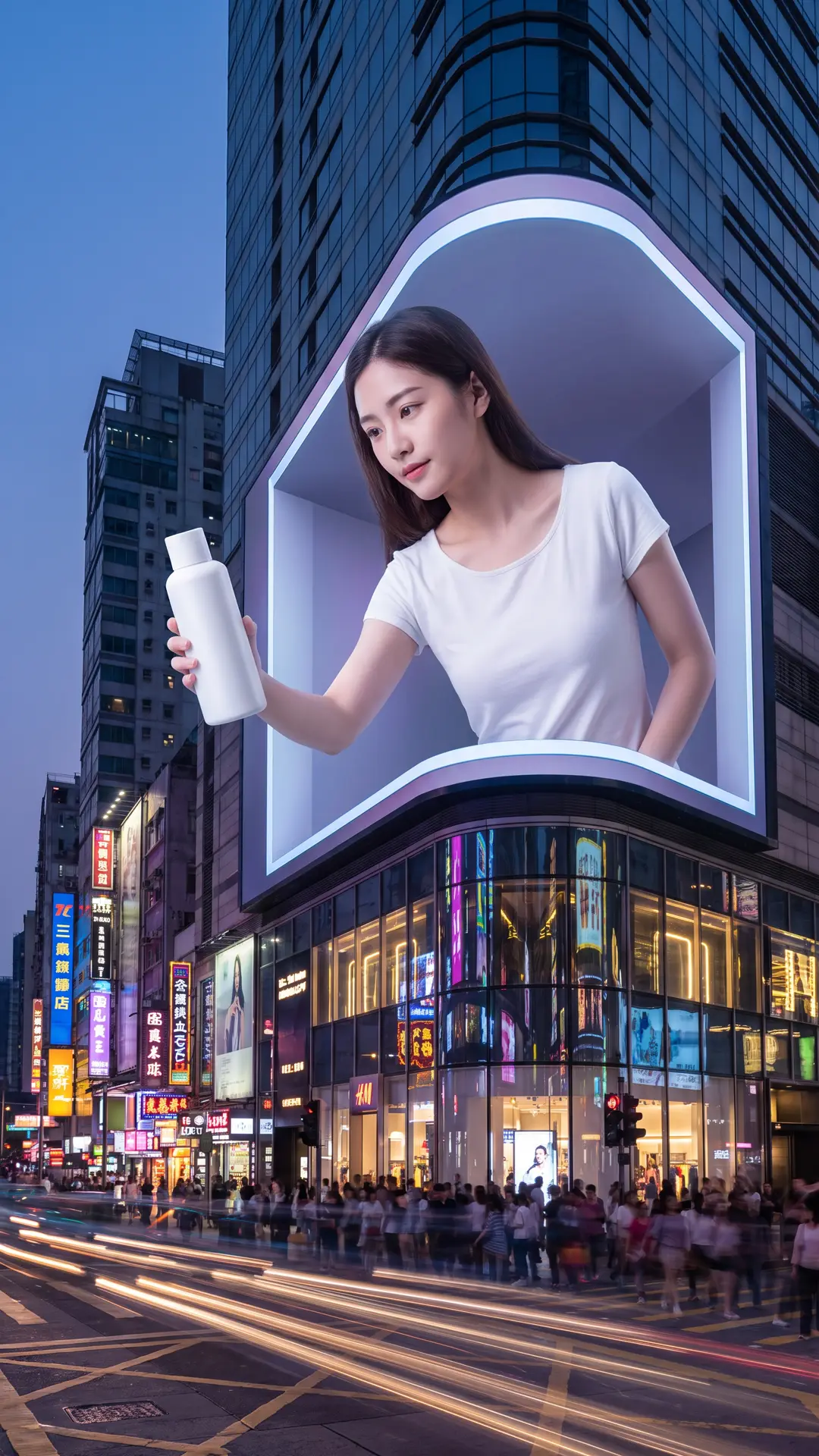
3D billboard pop-out example

3D billboard pop-out

You add: A photo of a person, or one of your AI Influencers, and a photo of your product.

The still puts them on a giant curved 3D billboard over a busy city street, holding the product. The video has them lean out of the screen and hand the product to the camera, ending on a hand holding it.

Make a billboard pop-out
Hand it to the camera walk example

Hand it to the camera walk

You add: A photo of your product. A person or an AI Influencer is optional; without one, the model draws a person.

The still shows them walking a sunny city street with the product. The video is a low tracking shot that rises from the feet, then they push the product into the lens and it fills the frame.

Make a product walk
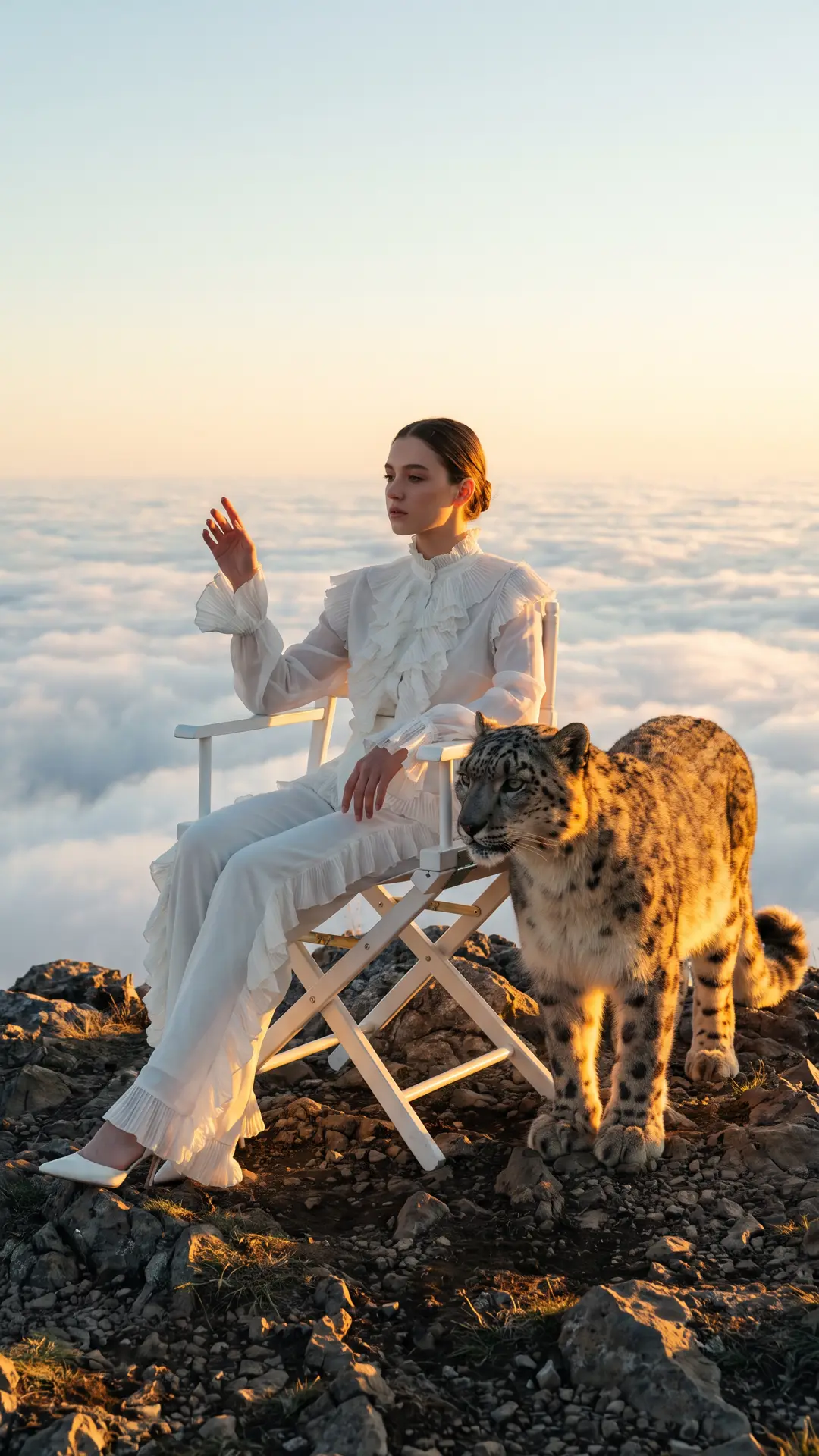
Wild animal companion example

Wild animal companion

You add: A photo of a person. Pick an animal (snow leopard, lion, tiger, wolf, black panther or eagle) and a place.

The still shows them seated in a director’s chair in that place. The video is one continuous scene: the animal arrives beside them and they stroke it. The default is a snow leopard on a mountain peak at sunset.

Add an animal

Is there a free AI tool to turn a selfie I already have into a scene video?

Yes, for a short first scene. A free account (20 sign-up credits, no card, verified email) can make the still and a clip of up to 6 seconds on Inflyu's AI Selfie to Video, with the Inflyu mark on the result. Longer clips need a credit pack, from $2.99 with no subscription.

What is the best AI tool to turn a selfie into a video?

The pages we read do not settle it. Hailuo describes photo templates but states no free tier or price, Kling's pricing page text did not load, Higgsfield lists video from images and references without a free tier, and Pika lists a free plan with no monthly credits (packs only). Inflyu adds a still you approve before the clip, with 20 sign-up credits and packs from $2.99.

Inflyu compared with other tools for turning a selfie into a scene video. Competitor facts come from each tool's own page, checked 1 Nov 2026.
ToolFree to tryWorks on your own photoNeeds a cardOutput limitEntry priceBad at
Inflyu20 sign-up credits with a free account; credit packs from $2.99Yes, you upload your own photoNo card to sign up. Packs are paid at checkout.clips of 3 to 15 seconds from one selfie, after a still you approve; a free account can make a scene of up to 6 secondsCredit packs from $2.99, no subscriptionYour face can drift between the still and the clip, because the face-keep line is only an instruction to the model
HailuoNot statedYes (templates say "Upload a photo to generate a video")Not statedNot statedNot stated (page shows "From /mo" with the amount missing)Not stated
KlingNot statedNot statedNot statedNot statedNot statedPricing and membership pages did not return plan text when fetched (page loads client-side).
PikaFree plan lists all models and 0 monthly credits (credit packs only); the plan list marks it without a watermarkNot statedNot statedFree plan: 0 monthly credits; clip length not statedStarter $10/mo billed monthlyFree plan excludes commercial license, priority queue and early model access.
HiggsfieldNot statedYes (home page: video from text, images and references)Not statedNot statedNot statedPricing page (higgsfield.ai/pricing) returned no plan details when fetched, so free tier and prices are unconfirmed.

Competitor facts come from each tool's own page, checked 1 Nov 2026.

Hailuo alternative for turning a selfie into a scene video

Hailuo and Inflyu's AI Selfie to Video both start from a photo of a person. Hailuo's templates say "Upload a photo to generate a video"; the pages we could read did not state its free tier, prices or clip limits, so we do not compare those. Inflyu's tool splits the job in two: it first draws a still of you in the scene you describe, you approve it, and only then does it animate the still into a clip of 3 to 15 seconds. A free account has 20 sign-up credits, and packs start at $2.99. Pick Hailuo for its photo templates. Pick Inflyu when you want to approve the look before the video is made.

Compare with Hailuo on its own page.

Does an AI selfie video look like me, and what are the limits?

Often close, but not always: the face can drift from your selfie in the still or the clip, so check it before you post. Inflyu lets you redo the still before it makes the clip. Clips run 3 to 15 seconds, and a sharp front-facing selfie works best.

Limits today

  • Likeness: the face can drift from your selfie in the still or the clip, so check it before you post. Inflyu keeps no face check for this tool.
  • Length: any whole second from 3 to 15. A free account's one video is capped at 6 seconds, so it covers a scene of up to that length; longer ones need a credit pack.
  • Scene text: up to 1000 characters. Very long or busy descriptions get cut or blended.
  • Two steps: the still comes first and is priced separately from the clip; you see both prices before you start.
  • Spending credits needs a verified email address.

What works best

  • A sharp, front-facing selfie with even light and nothing covering your face.
  • One clear action per scene, such as walking past a billboard or holding a product.
  • A preset when you are unsure where to start: billboard, product walk or animal.
  • Redo the still until the face looks right, then animate it.
Pay per step with credits

Put Yourself in the Scene

Create a free account, then run Selfie to scene video with credits.

Pay once with credit packs, or go monthly. Pack credits never expire.

Then credit packs from $2.99. No subscription required.

AI Selfie to Video FAQ

What does AI Selfie to Video do?+

You add one selfie and describe a scene. It first makes a still picture of you in that scene. When you approve the still, it turns it into a short video with 2 to 6 shots (never more shots than seconds).

Do I see the picture before the video is made?+

Yes. The still comes first, and no video is made until you approve it. If it is not what you wanted, you can roll a new still. Each new still costs 4 credits.

How much does it cost?+

4 credits for the scene still. Paid runs start at $2.99 (the entry pack); packs up to $59.99. The still comes first and the video is made only after you approve it. Each new still costs 4 credits again, and the price is shown before every step.

What are the limits?+

Add one selfie and describe the scene in up to 1,000 characters. The video runs any whole length from 3 to 15 seconds, in 2 to 6 shots (a second each at least), and sound is optional. The still can be 9:16, 16:9, 1:1.

Will it look exactly like me?+

Not always. The still is drawn by a model that is asked to keep your face as it is in the photo, but it can drift, and the video can drift further. Use a clear, front-facing selfie, and check the still before you approve it.

Can I plan the shots?+

Yes. You write what each shot shows, and add or remove shots, from 2 up to 6 (never more shots than seconds). The total length you pick is split across the shots.

Does the video have sound?+

Sound is optional. Turn it on and the video comes with generated sound; leave it off and the clip is silent. Sound adds to the video price, and the price shows before you run.

Are there ready-made setups?+

Yes, three. A 3D billboard pop-out (a person and your product photo), a product walk that ends with the product pushed into the lens (a product photo, with a person optional), and a wild animal companion (a person photo, an animal and a place). Each opens this tool with the scene and the shots filled in, and you still approve the still first.

Do I need an account?+

Yes. Create a free account and verify your email, then run the tool with credits. There is no anonymous generation.

Is there a free AI tool to turn a selfie I already have into a scene video?+

Yes, for a short first scene. A free account (20 sign-up credits, no card, verified email) can make the still and a clip of up to 6 seconds on Inflyu's AI Selfie to Video, with the Inflyu mark on the result. Longer clips need a credit pack, from $2.99 with no subscription.

How do I turn a selfie into a scene video with AI?+

Add a clear selfie, describe the scene, approve the still Inflyu draws of you in it, then animate it into a clip of 3 to 15 seconds. The price shows before each step runs.

What is the best AI tool to turn a selfie into a video?+

The pages we read do not settle it. Hailuo describes photo templates but states no free tier or price, Kling's pricing page text did not load, Higgsfield lists video from images and references without a free tier, and Pika lists a free plan with no monthly credits (packs only). Inflyu adds a still you approve before the clip, with 20 sign-up credits and packs from $2.99.

Hailuo alternative for turning a selfie into a scene video+

Inflyu's AI Selfie to Video draws a still of you in your scene, lets you approve it, then animates it into a clip of 3 to 15 seconds. Hailuo's templates say "Upload a photo to generate a video", and the pages we read state no free tier or price. Choose Hailuo for its templates, and Inflyu to approve the look first, starting with 20 sign-up credits.

Does an AI selfie video look like me, and what are the limits?+

Often close, but not always: the face can drift from your selfie in the still or the clip, so check it before you post. Inflyu lets you redo the still before it makes the clip. Clips run 3 to 15 seconds, and a sharp front-facing selfie works best.

Do I need a subscription?+

No. You can pay as you go: credit packs are one-time purchases and their credits never expire. If you would rather have a steady supply, the monthly Starter ($9.99), Creator ($19.99), Pro ($49.99) and Brand ($99.99) plans refill your credits each month, and you can cancel anytime. Unused monthly credits do not roll over.