Turn a photo into
a dance video
Yes, for a short clip. Inflyu's AI Dance Video Generator copies the movement of a clip you pick onto the person in your photo. The source clip runs 3 to 15 seconds and must show exactly one person. A free account with 20 sign-up credits and no card can use a source clip of up to 6 seconds, the limit on a free account's one video, and the result carries the Inflyu mark. Longer clips need a credit pack from $2.99.


Creators already dancing with AI
Bring your own dance
You bring the dance. Inflyu animates your photo to it.
Link or upload
Paste a public TikTok, Reels or YouTube Shorts link, or upload the clip yourself.
Your photo or your AI influencer
One clear, front-facing photo is enough. A saved AI influencer works the same way.
Motion transfer
The dance moves in the clip are transferred onto your photo.
Checked before you pay
Clips need exactly one dancer: you see a message before anything is charged if that is not the case.
Silent by design
The result has no sound. Add the original sound back in TikTok or Reels after you download it.
From 5 credits
Paid runs start at $2.99 (the entry pack); packs up to $59.99. The price is shown before you generate.
How do I make a photo dance with AI?
Follow these steps in the app.
Pick the dance clip
Paste a link to the video you want to copy, or upload a clip of 3 to 15 seconds with exactly one person in it.
Add your photo
Use a clear photo of the person who should dance, with the body visible.
Confirm you have the right to use both
A tick box asks you to confirm before it runs.
Choose the quality and generate
Pick 480p or 720p; the price shows first, and the result is a silent video.
Is there a free AI tool to make my photo dance like a video I already have?
Yes, for a short clip. A free account (20 sign-up credits, no card, verified email) can use a source clip of up to 6 seconds on Inflyu's AI Dance Video Generator, and the result carries the Inflyu mark. Longer clips, up to 15 seconds, need a credit pack, from $2.99 with no subscription.
What is the best AI tool to make a photo dance?
Among the tools we read, Viggle AI states a free plan of 5 videos a day with a watermark and Pro at $7.99 a month, Magic Hour says its core tools are free to try without signing up, Vidnoz lists a free plan at $0, and Kling's page text did not load. Inflyu copies the motion of a clip you pick onto your photo, with 20 sign-up credits and packs from $2.99.
| Tool | Free to try | Works on your own photo | Needs a card | Output limit | Entry price | Bad at |
|---|---|---|---|---|---|---|
| Inflyu | 20 sign-up credits with a free account; credit packs from $2.99 | Yes, you upload your own photo | No card to sign up. Packs are paid at checkout. | Copies the motion of a 3 to 15 second clip with one person, 480p or 720p, silent; a free account can use a clip of up to 6 seconds | Credit packs from $2.99, no subscription | There is no ready-made dance library; you bring the clip you want to copy |
| Viggle AI | Free plan: 5 free videos a day; new API accounts get 100 free credits | Yes (uploads of your own motion video, 1 min max on free) | Not stated | 5 videos a day, 1 generation at a time, 1 min max upload; the watermark comes off only on paid plans | Pro $7.99/mo (was $9.99) | Free plan has a watermark and a 1-minute upload limit; no-watermark exports need Pro. |
| Magic Hour | Core tools free to try without signing up | Not stated | No ("Free to try · No card required") | Not stated | Creator $12/mo billed yearly ($19/mo monthly) | Exports without the watermark are a paid-plan feature. |
| Vidnoz | Free plan at $0/mo; banner offers 60 free credits every day | Yes (Photo Avatars: "Transform your photos into talking avatars") | Not stated | Free: up to 3 min per video, 720p export, 2,000 characters per scene | Starter: 15 credits a month (the monthly price is blank on the page; credits are listed at $2 each) | Free plan has no voice clone, and Expressive Avatar is billed at 2 credits for each second. |
| Kling | Not stated | Not stated | Not stated | Not stated | Not stated | Pricing and membership pages did not return plan text when fetched (page loads client-side). |
Competitor facts come from each tool's own page, checked 1 Nov 2026.
Viggle AI alternative for making a photo dance like a video
Viggle AI and Inflyu's AI Dance Video Generator both move a character with a clip of your own. Viggle's pricing page lists a free plan with 5 free videos a day, one generation at a time and a 1 minute upload limit, and Pro at $7.99 a month; the watermark comes off only on paid plans. Inflyu works from one photo and one clip of 3 to 15 seconds, gives 20 sign-up credits once instead of a daily allowance, and sells packs from $2.99. Pick Viggle if you want a daily free allowance. Pick Inflyu if you prefer packs without a subscription and a price on screen before each run.
Compare with Viggle AI on its own page.
Does an AI dance video look realistic, and what are the limits?
It copies the movement well when the dancer is fully in view, but faces, clothes and hands can change, so check the result before you post. The source clip must show exactly one person, runs 3 to 15 seconds, and the video is silent.
Limits today
- Source clip: 3 to 15 seconds with exactly one person. A free account's one video is capped at 6 seconds, so a longer clip needs a credit pack.
- Likeness: the character comes from your photo and the movement from the clip. Faces, clothes and hands can change on the way, so check the result.
- Fast spins, a hidden body and a crowded frame are where the movement copy slips; keep the dancer fully in view.
- Sound: none. The video is silent, so add the music in another tool.
- Rights: you confirm you may use both the photo and the clip. Spending credits needs a verified email address.
What works best
- A clip with one dancer, fully in view, filmed with a steady camera.
- A photo with the whole body visible and a pose near the clip’s first frame.
- A clip of 6 seconds or less for the first try on a free account.
- 480p to test the movement, 720p once it looks right.
Trend and dance examples made with Inflyu
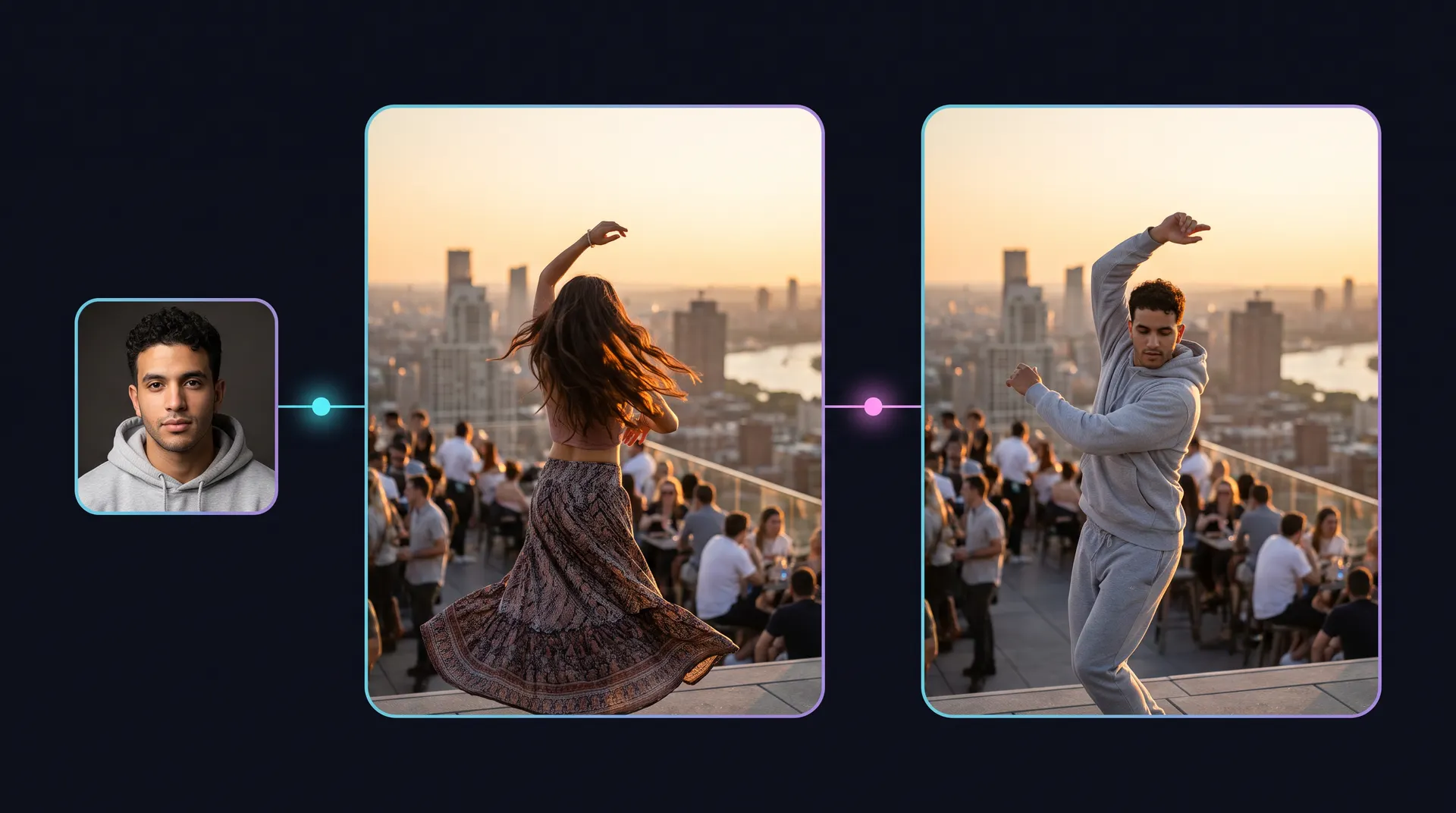
A portrait and a dance trend go in; the same dance with the person in it comes out. Made with Inflyu tools to show what they produce. These are examples, not customer results.
Questions
Do I need to know how to dance?+
No. The motion in your dance clip is transferred onto your photo, or onto your AI influencer. You need one clear, front-facing photo.
Which dance clip can I use?+
Any clip you own or have permission to use. Paste a public TikTok, Reels or YouTube Shorts link, or upload the video file.
How much does an AI dance video cost?+
Paid runs start at $2.99 (the entry pack); packs up to $59.99. The price is shown before you generate.
Does the dance video have sound?+
No. The output is silent by design. Add the original sound back in TikTok or Reels after you download it.
What happens if the clip has more than one person?+
Dance clips need exactly one dancer. If your clip has more or fewer, you get a message before anything is charged.
Can I use my AI influencer instead of my own photo?+
Yes. Any saved AI influencer with a clear reference photo works the same way as a personal photo.
Is there a free AI tool to make my photo dance like a video I already have?+
Yes, for a short clip. A free account (20 sign-up credits, no card, verified email) can use a source clip of up to 6 seconds on Inflyu's AI Dance Video Generator, and the result carries the Inflyu mark. Longer clips, up to 15 seconds, need a credit pack, from $2.99 with no subscription.
How do I make a photo dance with AI?+
Paste a link to the dance clip or upload one of 3 to 15 seconds with exactly one person, add a clear photo of the person who should dance, confirm you have the rights, then pick 480p or 720p and generate. The result is silent.
What is the best AI tool to make a photo dance?+
Among the tools we read, Viggle AI states a free plan of 5 videos a day with a watermark and Pro at $7.99 a month, Magic Hour says its core tools are free to try without signing up, Vidnoz lists a free plan at $0, and Kling's page text did not load. Inflyu copies the motion of a clip you pick onto your photo, with 20 sign-up credits and packs from $2.99.
Viggle AI alternative for making a photo dance like a video+
Inflyu's AI Dance Video Generator copies the movement of a 3 to 15 second clip onto your photo, with 20 sign-up credits and packs from $2.99. Viggle AI's pricing page lists 5 free videos a day with a watermark and Pro at $7.99 a month. Choose Viggle for a daily allowance, and Inflyu for packs without a subscription.
Does an AI dance video look realistic, and what are the limits?+
It copies the movement well when the dancer is fully in view, but faces, clothes and hands can change, so check the result before you post. The source clip must show exactly one person, runs 3 to 15 seconds, and the video is silent.
Do I need a subscription?+
No. You can pay as you go: credit packs are one-time purchases and their credits never expire. If you would rather have a steady supply, the monthly Starter ($9.99), Creator ($19.99), Pro ($49.99) and Brand ($99.99) plans refill your credits each month, and you can cancel anytime. Unused monthly credits do not roll over.
 Clone Trend (any TikTok or Reel trend) →