Write an AI image prompt
that gets the picture you meant
Write a prompt with the five-part formula, read the price before you click, make one image and know which single thing to change next. The 20 sign-up credits cover it once your email is verified.


Written by the Inflyu team
Lesson 1. After it you can: Write a prompt with the five-part formula, read the price before you click, make one image and know which single thing to change next. The 20 sign-up credits cover it once your email is verified.
The steps
Step 1
Open Create and find the prompt box
Go to Image, then Create. You type your description in the prompt box. Under it sit the options: Model, Aspect, Count (1 to 4), Style, Enhance and Reference images. The Model starts on Auto, which quotes the price for your run. The standard price of one picture is 2 credits, and Auto can quote a different price for the tier it picks. You do not need to change anything yet.
Step 2
Write the prompt with five parts
Say what is in the picture (subject), where it is (setting), how it is lit (light), how it is shot (lens or camera) and the look you want (style). You can write them in one line, in any order, with the subject first. The picture below came from a very short prompt, so the model chose the bottle, the light and the framing for you.
The prompt
Perfume on wet black rock, splash
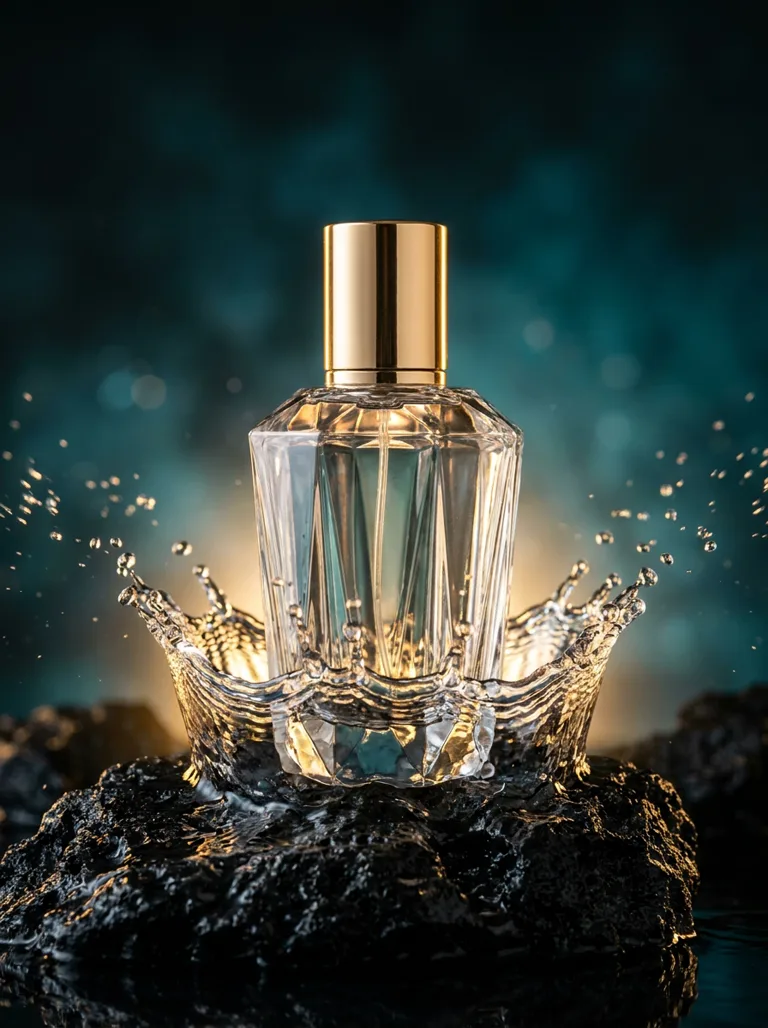
The example on the Inflyu homepage. The prompt bar for it reads as shown. The model made every choice the prompt left open. Step 3
Add the parts you want to control
Compare with a prompt that names each part. This one gives the subject (food on a table), the setting (white marble), the camera (an overhead shot), the light (soft window light) and the style (professional food styling). The picture is a preset still on Inflyu for this prompt. The overhead view, the soft light and the styled food match the words. The table is wood, not the white marble the prompt asked for, so a model does not always follow every part. It was also made with a different model than the Create default, so your own run will look different.
The prompt
Stunning food flat lay photography, colorful fresh ingredients artistically arranged on white marble, perfectly overhead shot, natural soft window light, professional food styling with garnish details
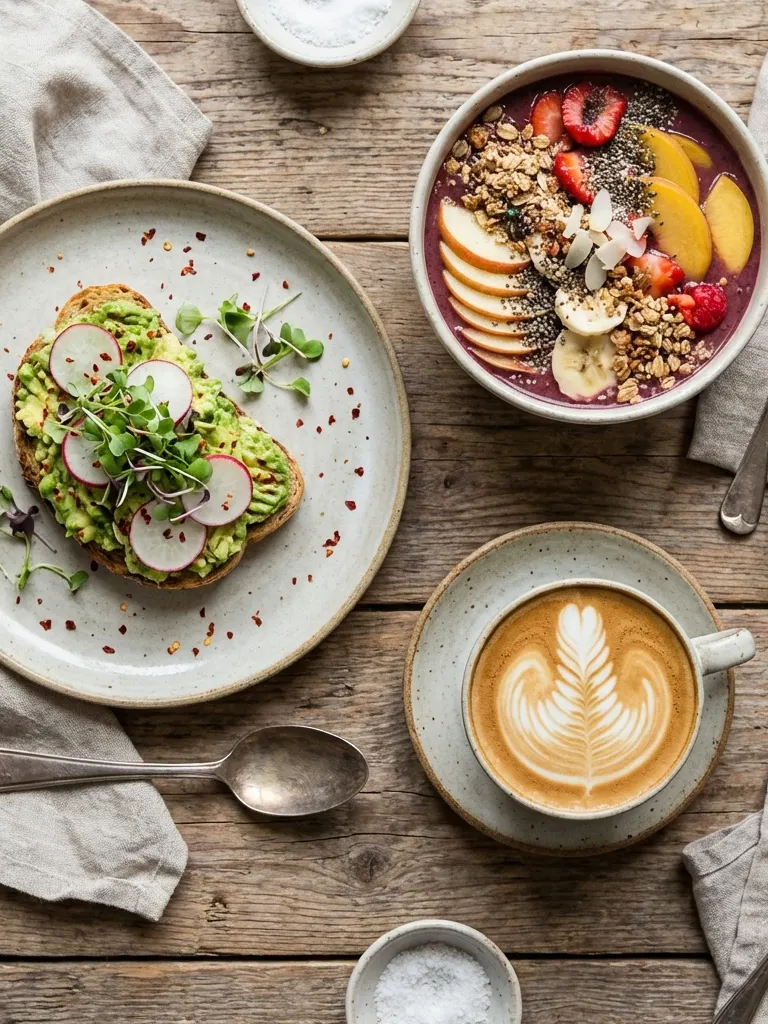
A preset still on Inflyu for the prompt shown with it. The overhead view and soft light match. The table is wood, where the prompt said white marble. Step 4
Read the price on the Generate button
The button reads Generate with a credit price next to it. That is the price for this run, shown before anything is spent. On Auto it follows the tier you picked, so it can differ from the standard price of one image (2 credits). Turn on Enhance only if you want it: it rewrites your description for a better picture and adds 1 credit per result. Count above 1 makes that many pictures, each priced on its own.
Step 5
Press Generate and read the result
Your picture lands in History. Look at it with the five parts in mind: is the subject right, is the setting right, is the light what you asked for? The model also adds things you did not ask for. In the picture below the prompt left the product open ("sleek modern product"), so the model chose a phone, two hands and an open box. The surface is pale and the light is soft, so not every part of the prompt carried over.
The prompt
Premium product photography, sleek modern product centered on polished marble surface, dramatic directional lighting with soft shadows, luxury minimalist background, commercial quality
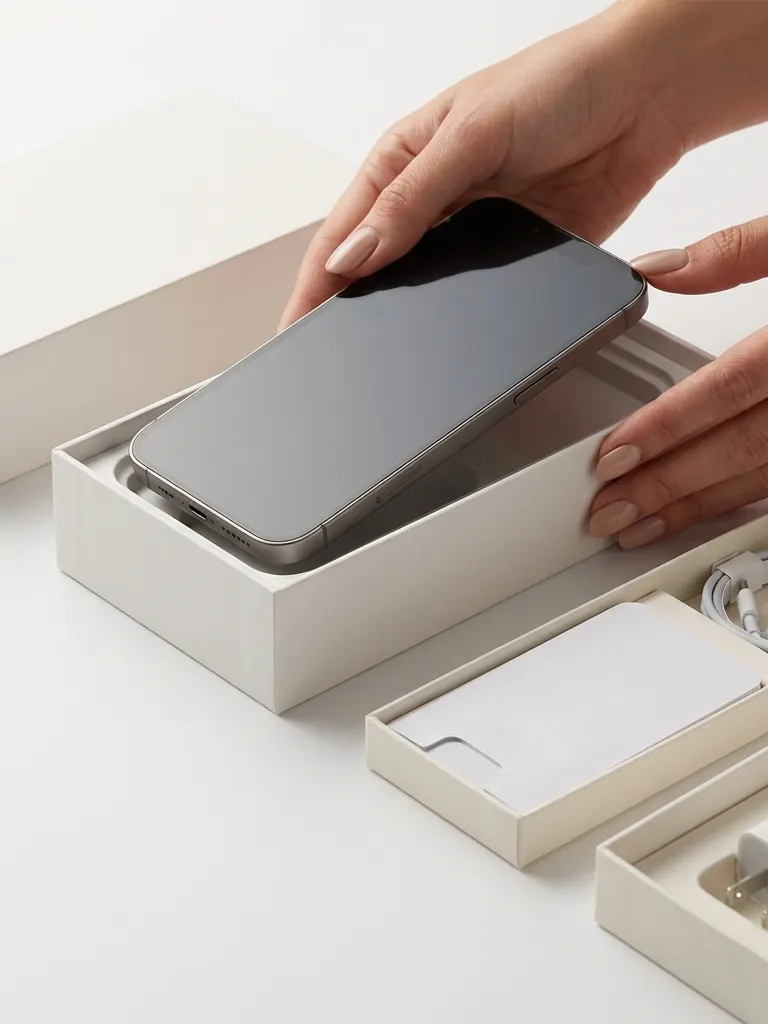
A preset still on Inflyu for the prompt shown with it. The phone, the hands and the box are choices the model made, and the light is soft where the prompt asked for dramatic. Step 6
Change one thing and run again
Pick the part that missed and change only that part. Light wrong? Rewrite only the light. If you change the subject, the light and the style at once, you will not know which change did what. Each new run shows its own price on the button first.
Common mistakes
- Writing "nice" or "beautiful" and nothing else. Name the light (soft window light, golden hour) and the camera (overhead, close-up, wide) instead.
- Packing three subjects into one prompt. Start with one subject, then add the second in a later run.
- Changing five things between runs. Change one, so you can tell what worked.
- Setting Count to 4 on a first try. Each picture is priced, so four pictures cost about four times one. Start on 1.
- Trusting lettering in the picture. If your image has words in it, check the spelling letter by letter before you use it.
Limits to know
- A free account makes 2 images in total, across all tools. The next one opens the pack screen.
- Free results carry a small mark. Verify your email to use them. Google sign-in doesn't count.
- A free account runs one picture at a time, so Count options above that are greyed out with the reason.
- Count goes from 1 to 4. A prompt can be up to 5,000 characters, and some models take fewer.
- The same prompt gives a different picture on a different model, and a little different on every run.
What it costs
| Action | Cost |
|---|---|
| One image on Auto, standard tier | 2 credits |
| Enhance prompt, per result | +1 credit |
| Four images in one run (Count 4) on Auto, standard tier | 8 credits |
| Images a free account can make in total | 2 |
What you will learn
Write a prompt with the five-part formula, read the price before you click, make one image and know which single thing to change next. The 20 sign-up credits cover it once your email is verified.
The prompt formula: subject, setting, light, lens or camera, and style.
Where the price shows before anything is spent, and what the options in the prompt box do.
How to read a result and change one thing per run, so each try teaches you something.
The steps
Each step is written out in full above, with the result to expect.
Open Create and find the prompt box
Go to Image, then Create. You type your description in the prompt box. Under it sit the options: Model, Aspect, Count (1 to 4), Style, Enhance and Reference images. The Model starts on Auto, which quotes the price for your run. The standard price of one picture is 2 credits, and Auto can quote a different price for the tier it picks. You do not need to change anything yet.
Write the prompt with five parts
Say what is in the picture (subject), where it is (setting), how it is lit (light), how it is shot (lens or camera) and the look you want (style). You can write them in one line, in any order, with the subject first. The picture below came from a very short prompt, so the model chose the bottle, the light and the framing for you.
Add the parts you want to control
Compare with a prompt that names each part. This one gives the subject (food on a table), the setting (white marble), the camera (an overhead shot), the light (soft window light) and the style (professional food styling). The picture is a preset still on Inflyu for this prompt. The overhead view, the soft light and the styled food match the words. The table is wood, not the white marble the prompt asked for, so a model does not always follow every part. It was also made with a different model than the Create default, so your own run will look different.
Read the price on the Generate button
The button reads Generate with a credit price next to it. That is the price for this run, shown before anything is spent. On Auto it follows the tier you picked, so it can differ from the standard price of one image (2 credits). Turn on Enhance only if you want it: it rewrites your description for a better picture and adds 1 credit per result. Count above 1 makes that many pictures, each priced on its own.
Press Generate and read the result
Your picture lands in History. Look at it with the five parts in mind: is the subject right, is the setting right, is the light what you asked for? The model also adds things you did not ask for. In the picture below the prompt left the product open ("sleek modern product"), so the model chose a phone, two hands and an open box. The surface is pale and the light is soft, so not every part of the prompt carried over.
Change one thing and run again
Pick the part that missed and change only that part. Light wrong? Rewrite only the light. If you change the subject, the light and the style at once, you will not know which change did what. Each new run shows its own price on the button first.
Homework: Make one image and explain it
Write one prompt with all five parts (subject, setting, light, lens or camera, style) in a note first.
No credits
Open Create, paste the prompt and read the price on the Generate button before you click.
No credits
Press Generate once with Count on 1, then write down the one part you would change.
Your creditsThe standard price of one image is 2 credits. The Generate button shows the price of your run first, and Auto can quote another tier. It counts toward the 2 images of a free account.
Check yourself: You have one picture in History, a prompt you can split into five parts, and one sentence that starts "next I will change only the ...".
Your first AI image: questions
What is an AI image prompt?+
It is the text you type to describe the picture you want. The model reads it and draws a picture from it. More exact words about the subject, light and camera give you fewer surprises.
Do the five parts have to be in a fixed order?+
No. Start with the subject so the picture has a clear centre, then add the setting, light, camera and style in any order that reads well.
How long should an image prompt be?+
One to three sentences is plenty to start. The box accepts up to 5,000 characters, and some models accept fewer, so a long list is rarely needed.
Why does my picture look different from the examples here?+
The example pictures were made on Inflyu with the prompts shown, but not always on the model Create starts with. A different model reads the same words differently.
How many images can I make for free?+
20 free credits once per person, no card: one free video swap up to 6 s, or a 4 s clip plus 2 images. Verify your email to use them. Google sign-in doesn't count. A free account makes 2 images in total across all tools.
What does Enhance prompt do?+
It is an optional switch, off by default. It rewrites your description for the model you picked and adds 1 credit per result. The price on the Generate button includes it.
Do I need a subscription?+
No. You can pay as you go: credit packs are one-time purchases and their credits never expire. If you would rather have a steady supply, the monthly Starter, Creator, Pro and Brand plans refill your credits each month, and you can cancel anytime. Unused monthly credits do not roll over.