Baby face effect
Baby face turns the person in your photo into a version of themselves with soft, infant-like features and plays the change as a short clip. Add one photo of a face and get the video from your order page.
Example result
How it works
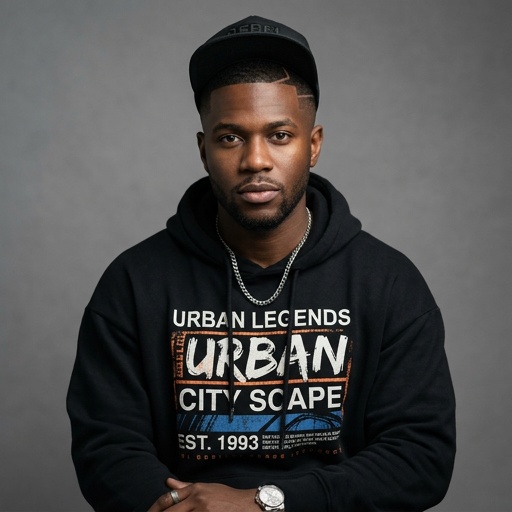
In the sample frame the subject is a man with a snapback cap, a silver chain and a black hoodie, standing against a gray backdrop with his eyes lowered and his hands moving together at chest height, which tells you the clip is mid-change rather than at rest. The effect aims at rounder cheeks, bigger eyes and smoother skin while the pose and outfit stay recognizable. People pick it for a laugh at a friend's expense, a baby-announcement joke, a before-and-after for a birthday post or a funny family chat reply. Among the transformation effects it changes the face rather than the age of the whole body or the creature type, so a grown-up stays dressed as a grown-up with a surprisingly babyish look.
- Select a photo where one face is large, sharp and turned toward the camera, with the forehead and chin both in view, so the softer features have a clear face to work on.
- The page displays the exact price for your photo before payment, and you pay with a card without registering an account.
- Once the change is rendered, the clip sits on your order page as a short video that you can download and share.
Limits
- Add a single JPEG, PNG or WebP photo up to 10 MB.
- Sunglasses, masks, heavy filters or a face turned far to the side give the effect less to reshape, so a plain front-facing view works best.
- It is a short effect clip, not a long video, and your own result will differ from the sample because it is made from your photo.
Questions
Does Baby face change my whole body or only my face?
The effect is about the face. The idea is soft, infant-like features on someone who still wears their own clothes and holds their own pose, as in the sample, where the hoodie and cap stay in place.
What is the man doing with his hands in the Baby face sample?
The 5 second clip comes from a generated sample photo, and the frame shows his hands moving together in front of his chest while his eyes look down. It illustrates the effect in motion. Your clip is built from your own photo, so the movement may differ.
Can I use a photo of a child with Baby face?
The effect is written for adult-looking faces that get softened, so a photo of someone already very young leaves it with little to change. A clear shot of a grown-up face is the better match.
Will Baby face still look like the person, or become a different baby?
The clip is generated from your photo and aims to keep recognizable parts such as hair, clothes and pose, but I cannot promise how closely the face matches. Treat it as a playful take rather than a portrait.
Is Baby face better than Youth rewind for a funny post?
Baby face goes for a comic, exaggerated soft face. Youth rewind leans toward a younger version of you, so choose Baby face if you want the joke and Youth rewind if you want a gentler look back.