Cheap AI Background Changer
Inflyu's AI Background Remover is paid per run with a credit pack, and it replaces the background instead of exporting a transparent cut-out. Upload a photo with a clear subject, describe the new scene, and the subject is placed in it. Credit packs start at $2.99 with no subscription, and the price is shown before you start. Free to sign up, no card.
Product shots and portraits should not require a studio day. Signing up is free and each run is paid with a credit pack.
See the full AI Background ChangerSign up to run it
Paid per run. See the examples first.
See What You Can Create
Real examples rendered with Change background
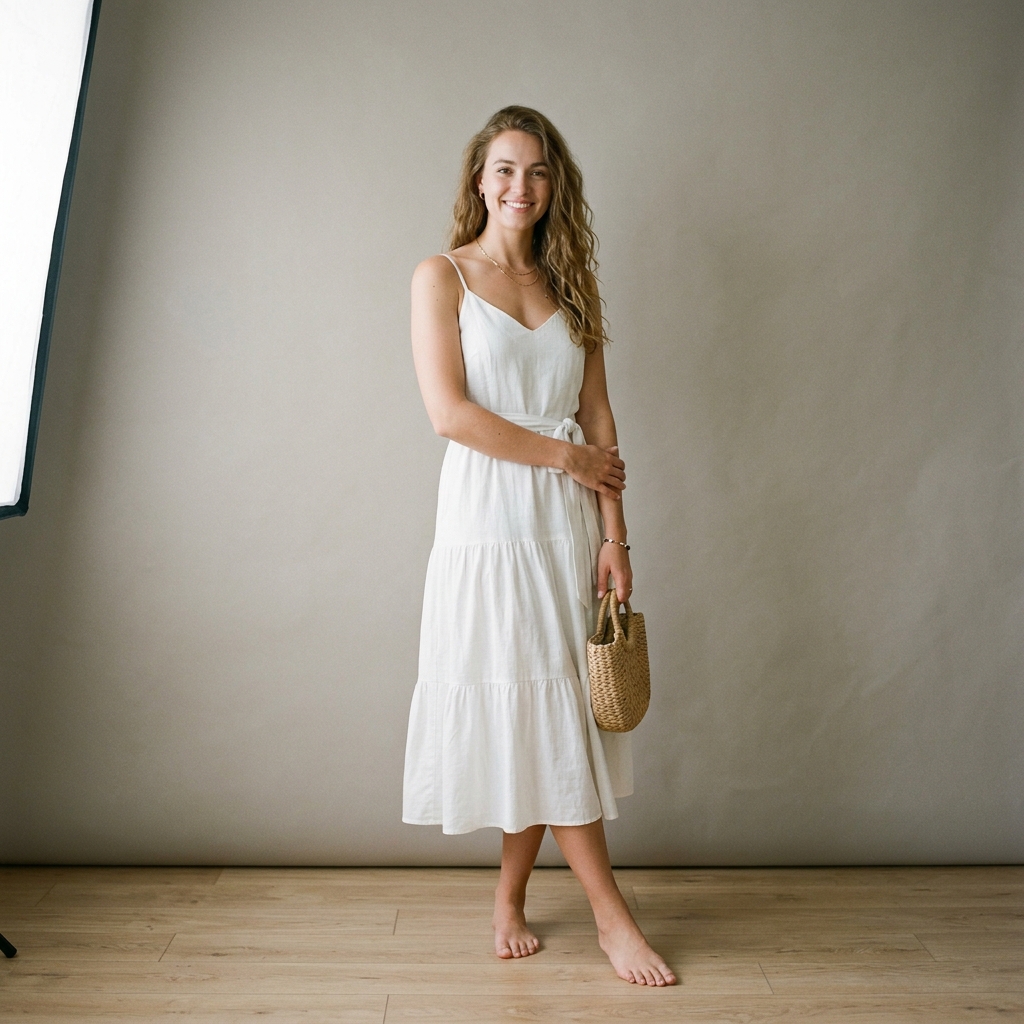 Before
 After
Santorini Sunset Reimagine
 Before
 After
Cyberpunk Shibuya Night
 Before
 After
Ghibli Studio Illustration
How do I remove or change the background of a photo with AI?
Upload your photo
Upload your photo. Choose a portrait, product shot or any image with a clear subject, up to 10 MB.
Describe the new background
Describe the new background. Type the scene you want, such as a tropical beach at sunset or a white studio backdrop.
Run the swap
Run the swap. The subject is kept and the background is replaced with your scene.
Download the result
Download the result. Preview the composite and save it.
Is there a free AI tool to remove the background from a photo I already have?
Free to sign up, with up to 20 bonus credits that open with your first pack from $5.99, and the face, person, object and car swap tools give one free preview picture. Inflyu's AI Background Remover is paid per run with a credit pack, from $2.99 with no subscription, and it replaces the background with a scene you describe instead of exporting a transparent cut-out. Every video and every other tool is paid per run with a credit pack. Credits already held unlock with any pack.
What is the best AI tool for removing the background from a photo?
It depends on whether you need a cut-out. Pixelcut (no sign-up, files up to 8000x8000 px and 100 MB, downloads not watermarked), Fotor (no sign-up, files up to 60 MB and 8192x8192 px) and remove.bg export the subject on its own, while Photoroom limits free use and charges for high-resolution exports. Inflyu replaces the background with a described scene instead, paid per run with a credit pack from $2.99 with no subscription. Free to sign up, no card.
| Tool | Free tier | Works on your own photo | Needs a card | Output limit | Entry price | Bad at |
|---|---|---|---|---|---|---|
| Inflyu | Paid per run; credit packs from $2.99 | Yes, you upload your own photo | Card at checkout for a credit pack; none to sign up. | One background swap per run; photo up to 10 MB; results at about 1K resolution for registered users | Credit packs from $2.99, no subscription | It replaces the background with a scene you describe; it does not export a transparent cut-out or take an uploaded background |
| Photoroom | Get started for free | Yes (JPEG or PNG, any size) | Not stated | Not stated | Not stated | Free use is limited; high-resolution exports and more AI tools need an upgrade |
| Pixelcut | Free AI background remover | Yes (JPG, PNG, HEIC) | No sign-up needed | Up to 8000x8000 px and 100 MB per file; downloads are not watermarked | $8/mo billed yearly ($10/mo billed monthly) | Not stated |
| Fotor | Free to use with no sign up needed | Yes | No sign-up needed | Files up to 60 MB and 8192x8192 px | Not stated | If part of the subject is cut, the Magic Brush restores it |
| remove.bg | Remove Image Background 100% Automatically and Free | Not stated (implied) | Not stated | Not stated | Not stated | Not stated |
| insMind | You can try this tool online for free | Yes | Not stated | Not stated | Not stated | Fine or low-contrast edges may need manual checking |
Competitor facts come from each tool's own page, checked 1 Nov 2026.
Photoroom alternative for removing the background from a photo
Photoroom's page says you can get started for free with a JPEG or PNG of any size, and that free use is limited, with high-resolution exports and more AI tools on an upgrade. It is the closer fit if you need the subject cut out on its own. Inflyu's AI Background Remover does a different job: it keeps the subject and replaces the background with a scene you describe, and it does not export a transparent cut-out. Pick Photoroom for a cut-out; pick Inflyu to put the subject in a new setting. Inflyu is paid per run with a credit pack, from $2.99 with no subscription. Free to sign up, no card.
Compare with Photoroom on its own page.
Does an AI background remover look realistic, and what are the limits?
It can look natural when the subject is clear and evenly lit, but fine hair, glasses and fur can shift at the edges. It replaces the background with a described scene and does not export a transparent cut-out. Free to sign up, no card.
Limits today
- The tool swaps the background for a scene you describe; it does not export a transparent cut-out and does not take an uploaded background image.
- Fine hair, glasses and fur can shift at the edges of the subject.
- A cut-out mode (Remove) is in the Studio Background Editor in the app.
- If the AI's safety filter declines a photo, or the provider fails, you are not charged.
What works best
- A sharp photo up to 10 MB with one clear subject that stands out from the background.
- A short, concrete scene description, such as a white studio backdrop or a street at dusk.
- Even lighting on the subject, so the new background has something to match.
Frequently Asked Questions
Is changing a background cheap here?
Jobs use credits; buy an affordable credit pack for a batch of swaps.
Can I describe the new scene?
Yes, and you need to. Describe a beach, studio, city, or other backdrop and the AI replaces the background. It does not cut the subject out onto a transparent background; the Studio Background Editor has a Remove mode for that.
Do I need a card to sign up?
No card to sign up, and account creation is free. Sign up and buy a credit pack to run this tool.
Where do extra jobs come from?
Buy an affordable credit pack after signup. Credits stay on your user and do not expire.
How do I remove or change the background of a photo with AI?
Upload a photo with a clear subject, describe the new background in a few words, run the swap, then preview the composite and save it. The subject stays and the background is replaced.
What is the best AI tool for removing the background from a photo?
It depends on whether you need a cut-out. Pixelcut (no sign-up, files up to 8000x8000 px and 100 MB, downloads not watermarked), Fotor (no sign-up, files up to 60 MB and 8192x8192 px) and remove.bg export the subject on its own, while Photoroom limits free use and charges for high-resolution exports. Inflyu replaces the background with a described scene instead, paid per run with a credit pack from $2.99 with no subscription. Free to sign up, no card.
Photoroom alternative for removing the background from a photo
Inflyu's AI Background Remover is an alternative when you want a new setting rather than a cut-out: it keeps the subject and replaces the background with a scene you describe. It does not export a transparent cut-out. Inflyu is paid per run with a credit pack, from $2.99 with no subscription; Photoroom's page says free use is limited. Free to sign up, no card.
Does an AI background remover look realistic, and what are the limits?
It can look natural when the subject is clear and evenly lit, but fine hair, glasses and fur can shift at the edges. It replaces the background with a described scene and does not export a transparent cut-out. Free to sign up, no card.