Watercolor portrait
made with your photos
Yes, upload your own photo to Inflyu, pick a format and tap Generate to get the "Watercolor portrait" AI photo, with no prompt to write. It is free to try: a new account gets 20 sign-up credits and this trend starts at 2 credits, so your first one is covered. Spending credits needs a verified email, and Google sign-in alone does not count as verified. A failed generation is refunded.


Creators already copying trends
Formats you can make
Pick one. The price is shown before you generate.
Photo · 2 credits
1 image
How do I make the "Watercolor portrait" AI photo with my own photo?
Follow these steps in the app.
Add your photos
Upload You (a clear photo of your face), or pick one of your AI influencers.
Pick a format
Choose photo. You see the credit price before you start.
Generate and post
Inflyu builds every scene for you. Download the result or keep it in your creations.
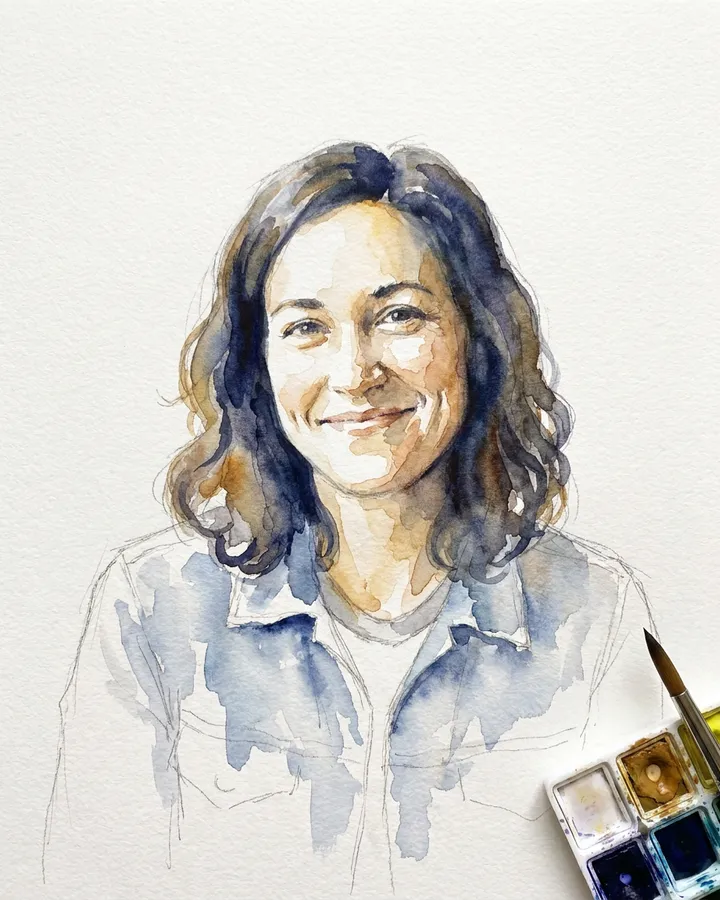
What this trend does
A soft hand-painted watercolor of you on textured paper.
From 2 credits. The exact price is shown before you generate.
Is there a free AI tool for the "Watercolor portrait" trend?
It is free to try: a new account gets 20 sign-up credits and this trend starts at 2 credits, so your first one is covered. Spending credits needs a verified email, and Google sign-in alone does not count as verified. After that, credit packs start at $2.49.
What is the best AI tool for the "Watercolor portrait" trend with my own photo?
It depends on what you start from. MyEdit's own page says: First video free, up to 1080p; 3 free daily credits. AI Photoshoot trends: first generation free. Try a Trend's own page says: Free preview (a still of you in the scene), up to 5 a day, no sign-up. The full video is paid. Media.io's own page says: Free plan: 3 daily check-in credits, 1 video, 720p, with a watermark. Inflyu opens this trend with its photo slots ready, shows every credit price first, and a free account has 20 sign-up credits with no card.
| Tool | Free to try | Works on your own photo | Needs a card | Output limit | Entry price | Bad at |
|---|---|---|---|---|---|---|
| Inflyu | 20 sign-up credits with a free account; credit packs from $2.49 | Yes, you upload your own photo | No card to sign up. Packs are paid at checkout. | photo for this trend, each with its credit price shown before you start | Credit packs from $2.49, no subscription | Needs an account with a verified email before credits are spent |
| MyEdit | First video free, up to 1080p; 3 free daily credits. AI Photoshoot trends: first generation free | Yes, Image to Video takes your photo; its AI Photoshoot trend templates take 1 to 4 of your photos | Not stated | Up to 1080p on the first video; later videos are paid with credits | From $7 a month billed $84 yearly (500 credits a month) | Image to Video and most image tools are paid with credits beyond the free daily credits |
| Try a Trend | Free preview (a still of you in the scene), up to 5 a day, no sign-up. The full video is paid | Yes, you upload 1 to 3 of your own photos depending on the trend | Not stated for the preview; paid videos use Stripe checkout | Paid: 720p vertical, 6 to 18 s depending on the trend. Free: a preview still only | Paid video from $4.99 for new customers, one-time with no subscription | The free tier is a still preview only, and the videos are silent |
| Media.io | Free plan: 3 daily check-in credits, 1 video, 720p, with a watermark | Yes, its Tiny Desk AI Trend page says to upload a clear portrait of yourself | Not stated | Free: 720p with a watermark. Paid: 1080p, with the watermark removed | From US$15.99 a month billed monthly (200 credits) | The free plan has a watermark and 1 video; removing the watermark at 1080p needs a paid plan |
| CapCut | Free plan: free templates and basic editing. Its AI video page offers a 7-day free trial; credits vary by account and region | Yes for AI video: its generator page says an uploaded image can be the starting frame | Not stated | Free plan: Not stated. Pro: Seedance 2.0 Mini up to 240 s at 720p | From USD 14 a month billed monthly, or USD 89.99 a year (1200 AI credits a month) | The free plan lists only templates and basic tools; AI credits and premium templates sit in Pro |
Competitor facts come from each tool's own page, checked 5 Nov 2026.
MyEdit alternative for making the "Watercolor portrait" AI photo with my own photo
MyEdit and Inflyu both turn your own photo into a trend. MyEdit's own page says: First video free, up to 1080p; 3 free daily credits. AI Photoshoot trends: first generation free. Inflyu opens the "Watercolor portrait" trend ready for your photo, shows each credit price before you start, and a free account has 20 sign-up credits with no card. Packs start at $2.49. Check MyEdit's current page if you want a price side by side.
Compare with MyEdit on its own page.
Will the "Watercolor portrait" trend look like me, and what are the limits?
It follows the trend with your photos in it, and the likeness depends on the photos you add. A clear, front-facing photo gives the closest match. It does not copy the original creator, and small details such as hands and text can come out wrong, so check each result before you post.
Limits today
- It is an AI remake of the trend from your photos. It copies the look and the idea, not the original creator, their face or their footage.
- The likeness depends on your photos. A clear, well-lit, front-facing photo gives the closest match, and small details such as hands, text and jewelry can come out wrong, so check each result before you post.
- This trend makes still images. It has no video version yet.
- Spending credits needs a verified email, and Google sign-in alone does not count as verified.
What works best
- You: A clear photo of your face.
- Photos where your face is clear and not hidden by sunglasses or a hand.
Questions
How do I make the "Watercolor portrait" AI photo with my own photo?+
Sign up, open the trend, add your photo, pick photo and tap Generate. No prompt writing is needed, and you see the credit price before you start. The result is a photo made from your own photos.
Is there a free AI tool for the "Watercolor portrait" trend?+
It is free to try: a new account gets 20 sign-up credits and this trend starts at 2 credits, so your first one is covered. Spending credits needs a verified email, and Google sign-in alone does not count as verified. After that, credit packs start at $2.49.
How much does it cost?+
Credits are only used when you generate: photo costs 2 credits. If a generation fails, the credits are refunded.
Which photos do I need?+
You: A clear photo of your face.
Can I use my AI influencer instead of my own photos?+
Yes. Pick any AI influencer you created in Inflyu and the trend keeps their look in every scene.
What is the best AI tool for the "Watercolor portrait" trend with my own photo?+
It depends on what you start from. MyEdit's own page says: First video free, up to 1080p; 3 free daily credits. AI Photoshoot trends: first generation free. Try a Trend's own page says: Free preview (a still of you in the scene), up to 5 a day, no sign-up. The full video is paid. Media.io's own page says: Free plan: 3 daily check-in credits, 1 video, 720p, with a watermark. Inflyu opens this trend with its photo slots ready, shows every credit price first, and a free account has 20 sign-up credits with no card.
MyEdit alternative for making the "Watercolor portrait" AI photo with my own photo+
Inflyu is an alternative when you want this exact trend opened for your photo with a credit price shown first. MyEdit's own page says: First video free, up to 1080p; 3 free daily credits. AI Photoshoot trends: first generation free. A free account on Inflyu has 20 sign-up credits and no card.
Will the "Watercolor portrait" trend look like me, and what are the limits?+
It follows the trend with your photos in it, and the likeness depends on the photos you add. A clear, front-facing photo gives the closest match. It does not copy the original creator, and small details such as hands and text can come out wrong, so check each result before you post.
Do I need a subscription?+
No. You can pay as you go: credit packs are one-time purchases and their credits never expire. If you would rather have a steady supply, the monthly Starter ($8.99), Creator ($19), Pro ($49) and Brand ($99) plans refill your credits each month, and you can cancel anytime. Unused monthly credits do not roll over.